

Sora Tanka
As a lifelong otaku and pop culture enthusiast, I spend my time exploring underground animation, vintage cinema, and the hidden gems of streaming media.
Published: September 1, 2026 | 5 min read | Last updated: September 1, 2026
Dandy's World Modded custom skins are all over TikTok right now, and half the comments underneath every clip ask the same thing: how do people actually make these? I spent a weekend testing both routes the community actually uses, Roblox's built in Catalog Avatar Creator inside a private server, and the from-scratch fan art method built on shared 3D Toon templates, so I could walk you through what genuinely works. Dandy's World itself is closing in on eight billion visits, and its fanbase treats Toon customization like its own side hobby. Below, you'll find the tools people are using (Blender, Ibis Paint X, Roblox Studio), the steps in order, the mistakes that waste the most time, and a few things nobody mentions before you start.
⚡ Quick Answer
To make a custom Toon skin for Dandy's World Modded, join a private server, pick your Toon, then rework its look with Roblox's Catalog Avatar Creator for a fast recolor, or build a full custom texture over a fan made 3D Toon template in Blender and Ibis Paint X for a from-scratch design. Always test it privately first.
What Is Dandy's World Modded, Anyway?
Dandy's World is the Roblox horror survival game built by designer Qwelver and her team at BlushCrunch Studio, and it is genuinely huge: the game crossed 7 billion visits on June 15, 2026, according to its own wiki changelog. "Dandy's World Modded" is a separate, fan-run Roblox experience inspired by it, distinct from the official BlushCrunch game, with its own community group and its own variants, including one nicknamed "Omega Modded" that's become the center of most current skin-making tutorials.

📊 Key Stat: The Dandy's World Modded community group on Roblox has roughly 190,000 members, separate from the official game's own audience of hundreds of thousands of concurrent players.
You might also like
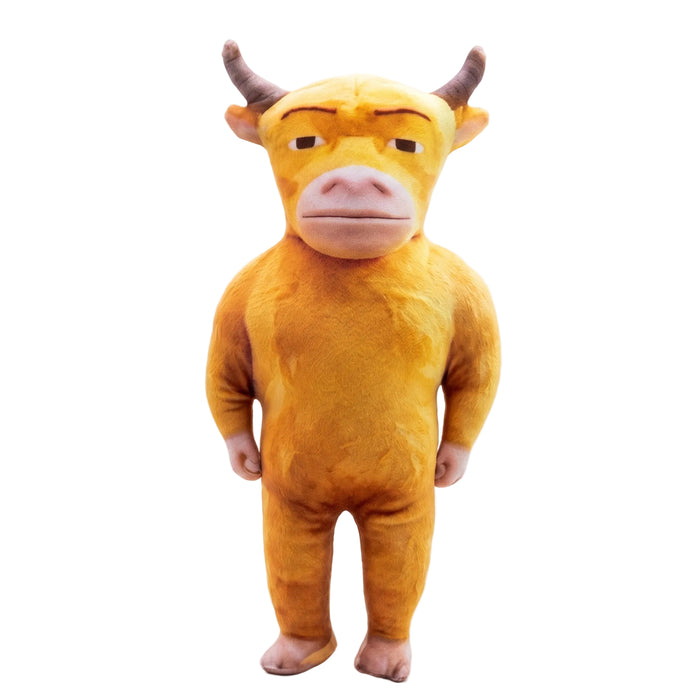

In my experience jumping between the official game's Toon Skins system and the modded scene, the two barely resemble each other. Official skins come from Dyle's Store, event shops, and Mastery rewards. Modded skins are almost entirely community made, and the tools and Discord links shift with every new modded build, so what worked last month may already look different.
What You'll Need Before You Start
- A Roblox account and access to a Dandy's World Modded private server
- Roblox's Catalog Avatar Creator (built in, no download needed) for the recolor route
- Blender (free) if you're building a full custom texture from a 3D Toon template
- Ibis Paint X or a similar layered paint app for mobile texturing
- A base Toon template, community-shared templates exist on sites like Sketchfab, always check the creator's terms before using one
📊 Key Stat: Dandy's World runs 33 playable Toons, each with a Twisted counterpart, giving skin makers dozens of base characters to redesign.
Difficulty and Time Estimate
Difficulty: Beginner for a Catalog Avatar Creator recolor, Intermediate to Advanced for a full custom texture built from a 3D template. Time: 30 to 90 minutes for a first recolor, several hours to a few days for a full custom skin.
How to Make a Custom Toon Skin, Step by Step
- Join or create a private server: Custom skin work should never happen in a public match. Start a private Dandy's World Modded server so nothing you're testing affects other players.
- Pick your base Toon: Choose the Toon whose proportions and features you're comfortable working around before you commit hours to a design.
- Sketch your palette first: Decide your two to four main colors on paper or in a quick mockup before opening any tool. This saves the most rework time of any step.
- Recolor route, open Catalog Avatar Creator: With your Toon equipped, use the built in dye and part tools to rework colors and layered pieces directly.
- From-scratch route, texture a 3D template: Import a properly credited Toon template into Blender, then paint the texture in Ibis Paint X or a desktop equivalent, working in layers so you can revert mistakes.
- Optimize before you're done: If you built or edited a 3D model, retopologize it to keep the poly count low. Roblox mobile struggles with dense meshes.
- Test, then share: Preview the finished skin in your private server first. Once you're happy, share screenshots on your platform of choice, and credit any template creator you built on.
You might also like
"1,000 CCUs"
Common Mistakes to Avoid
- Testing a new skin in a public match instead of a private server first
- Using someone else's 3D Toon template or artwork without checking their terms of use or crediting them
- Skipping retopology on a custom model, which causes lag on mobile devices
- Assuming every modded server offers the exact same skin tools. Features and invite links change between builds, so confirm what's currently available before you start
💡 Pro Tip: Make your first skin a straightforward recolor before attempting a full custom model. It teaches you the Catalog Avatar Creator's layering without the extra hours a 3D rebuild takes.
⚠️ Important: Dandy's World Modded is a fan project, not an official BlushCrunch Studio release. Server availability, features, and community rules can change without notice.
Frequently Asked Questions
What is Dandy's World Modded?
It's a fan-run Roblox experience inspired by BlushCrunch Studio's official Dandy's World, but built and maintained separately by the community, not by the original developers.
How do you make a custom skin in Dandy's World Modded?
Join a private server, pick a Toon, then either recolor it with Roblox's Catalog Avatar Creator or build a full custom texture over a 3D Toon template using Blender and a paint app.
What app do people use to make Dandy's World skins?
Blender is the most common tool for the 3D model itself, while Ibis Paint X is the go-to for texturing on mobile. Roblox's own Catalog Avatar Creator handles simpler recolors.
Can you use custom skins in the official Dandy's World game?
No. The official game only supports skins bought or earned through Dyle's Store, event shops, and Mastery quests. Custom skins are a modded-community feature only.
Is making custom Dandy's World skins allowed?
Rules vary by server and change over time, so check the specific modded server's current guidelines before you start, and always credit any template or asset you didn't make yourself.
Do you need Roblox Studio to make a custom Toon skin?
Not for a recolor, the Catalog Avatar Creator handles that in-browser. A full custom model built from scratch is closer to a Blender and image-editor workflow than a Studio one.
Final Thoughts
Custom Toon skins are less about a single official tool and more about which route fits the time you have. A recolor in Catalog Avatar Creator gets you a finished, personal-feeling Toon in under an hour. A full custom texture takes real effort, but it's the version people stop scrolling for on TikTok. Start with the recolor, learn how the layering works, then decide if the full rebuild is worth your weekend.